
Aqara is one of the most popular smart home brands: its sensors are small, affordable and run for years on a battery, and the newer devices support Matter and work with Apple Home, Google Home, Alexa and Home Assistant. In this guide you will learn which hub to choose, how Zigbee differs from Thread, which presence, motion, door and temperature sensors are worth buying and how to connect everything. At the end you will find ready-made bundles with prices.
In short: what you need to know
- Zigbee needs a hubClassic Aqara sensors (T1, P1, smoke, water) connect through an Aqara hub, such as the M100, M3 or the G2H Pro camera.
- Thread and Matter work without an Aqara hubDevices like the P2 or U200 go straight into Apple Home or Google Home if you have a Thread border router.
- Everything in one appAqara Home controls devices and automations, and the hub passes them on to Apple, Google, Alexa and Home Assistant via Matter.
What is Aqara and why people choose it
Aqara is a smart device brand that started in the Xiaomi ecosystem (which is why you often see it as “Xiaomi Aqara”), but today it operates independently with its own Aqara Home app. The range covers everything from tiny battery sensors to switches, relays and radiator valves, as well as cameras, doorbells and smart locks.
Why Aqara is so widespread:
- Small, efficient sensors: most run on a coin cell for months or years.
- Broad compatibility: Apple Home, Google Home, Amazon Alexa, Home Assistant and, thanks to Matter, other systems too.
- Local automations: rules between devices on one hub run directly on the hub, fast and without the cloud.
- Fair price: a reliable sensor costs about as much as lunch. See all products on the Aqara page.
Zigbee, Thread and Matter: the difference that decides your purchase
Aqara currently sells two generations of devices. Before you buy, it helps to know which one yours belongs to:
| Feature | Zigbee devices | Thread / Matter devices |
|---|---|---|
| Examples | T1 temperature, P1 motion, smoke detector, T1 water leak, T1/T2 relays | P2 motion, P2 door, U200 lock, FP300 in Thread mode |
| What they need | an Aqara hub (M100, M200, M3, E1, G2H Pro, G410) | a Thread border router: Aqara hub M3/M100/M200, G410 doorbell, Apple TV, HomePod or Google Nest Hub |
| Apple, Google, Alexa | via the Aqara hub (Matter bridge or HomeKit) | directly via Matter |
| Home Assistant | via the hub's Matter bridge or directly over Zigbee (ZHA, Zigbee2MQTT) | via the Matter integration |
| Battery life | typically very long | long, slightly shorter than Zigbee |
Some newer models, such as the FP300 or P100, support both, and you choose whether they run on Zigbee or Thread. According to the manufacturer, the FP300 lasts up to 3 years on batteries in Zigbee mode and up to 2 years in Thread mode.
Tip: If you have an Apple TV or HomePod and use Apple Home, you can add Aqara Thread devices without another hub. If you want affordable Zigbee sensors, local automations and the full Aqara Home app, an Aqara hub is worth it.
Which Aqara hub to choose


Zigbee sensors do not connect to Wi-Fi. The hub brings them into the app and other systems.
| Hub | Best for | Extras |
|---|---|---|
| Hub M100 | cheapest start, smaller flat | small USB hub, Zigbee and Thread, Matter bridge and Thread border router |
| Hub M200 | flat or house | LAN and Wi-Fi 6, Zigbee, Thread, Bluetooth and IR control |
| Hub M3 | larger house, many devices | Aqara's most powerful hub, Zigbee, Thread, Matter and IR |
| G2H Pro camera | camera and hub in one | Zigbee 3.0 hub inside an indoor camera, HomeKit Secure Video |
| G410 doorbell | starting at the front door | video doorbell, Zigbee hub, Matter controller and Thread border router |
A detailed comparison of all hubs, including older models, is in our article Aqara smart hubs – selection guide.
Aqara presence sensors: FP2, FP300 or FP400
A classic motion sensor turns the light off when you sit still. A presence sensor with mmWave radar detects even breathing and small movements, so the light stays on while you read or work. Aqara has three models, each suited to something different:
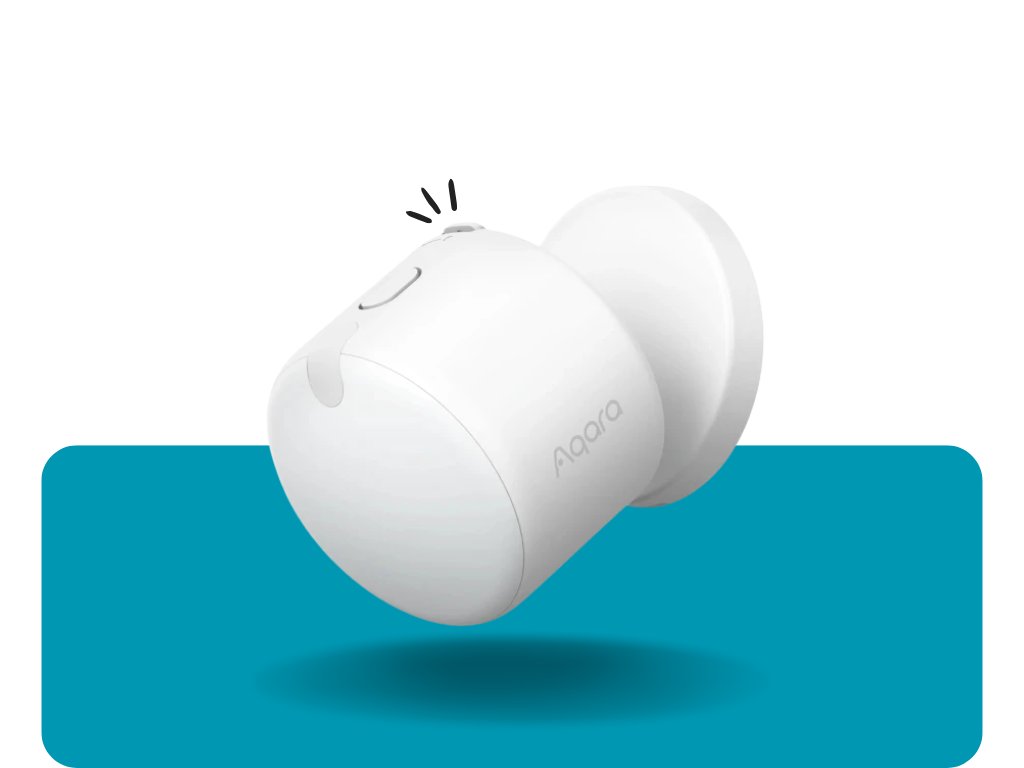 Aqara FP300Battery powered, presence plus temperature, humidity and light. Zigbee or Thread.€36.99
 Aqara FP2Wi-Fi, USB-C powered, up to 30 zones and 5 people, fall detection.€65.90
 Aqara FP40060 GHz radar, tracks up to 10 people in 8 zones. Zigbee and Matter over Thread.€65.99
- FP300 is the most versatile: no cable, so it goes anywhere, and it also measures temperature, humidity and light. Ideal for bedrooms, bathrooms and hallways.
- FP2 connects straight to Wi-Fi without a hub. It splits a room into zones (sofa, desk, kitchen counter), each with its own automation. It needs constant power.
- FP400 is for large, open spaces where several people move around, such as a living and dining area.
Motion, door, temperature, water and smoke sensors
These are the building blocks of every Aqara smart home. All the models below run on batteries:
| Sensor | Use | Protocol | Price |
|---|---|---|---|
| Motion Sensor P1 | hallway lights, alarm, energy saving | Zigbee | €17.80 |
| Motion Sensor P2 | the same for Apple Home and Google Home without an Aqara hub | Thread, Matter | €30.99 |
| Door and Window Sensor T1 | open window = heating off, door alerts | Zigbee | €14.49 |
| Door and Window Sensor P2 | doors and windows in Apple Home or Google Home | Thread, Matter | €24.50 |
| Multi-State Sensor P100 | doors, windows and vibration in one | Zigbee or Thread | €21.99 |
| Temperature and Humidity Sensor T1 | temperature and humidity in every room, ventilation, air conditioning | Zigbee | €18.99 |
| Water Leak Sensor T1 | under the washing machine, dishwasher, boiler | Zigbee | €16.90 |
| Smoke Detector | local alarm plus phone notification | Zigbee | €31.80 |
| Vibration Sensor | laundry finished, break-in attempt | Zigbee | €16.80 |
| Wireless Mini Switch T1 | one-press scenes such as “Leaving home” | Zigbee | €17.50 |
According to the manufacturer, the P1 motion sensor lasts up to 5 years on batteries. When a smoke or water sensor detects a problem, the hub can sound a siren, turn on the lights or close the water supply with the Valve Controller T1.
Heating with Aqara: W600 valve, W500 thermostat and W100 sensor
 W600 valveFor radiators, Zigbee or Thread and Matter, 0.5 °C accuracy, battery up to 2 years.€48.99
 W500 thermostatFor electric and water underfloor heating, fits a flush wall box.€57.99
 W100 climate sensorThermometer with display and buttons, works as an external sensor for the valve.€37.90
The biggest savings come from a combination: a W600 valve on every radiator, a window sensor that turns the heating down while you air the room, and a schedule based on when you are home. The valve can be paired with an external temperature sensor, so it regulates by the real room temperature rather than the temperature next to the radiator. If you are comparing brands, see our full range of radiator valves and our guide to Sonoff radiator valves.
Switches, relays, plugs and lights
- Light Switch H2 EU replaces a standard switch in a flush box and supports Zigbee as well as Thread and Matter. There is also a Dimmer Switch H2.
- Dual Relay Module T2 and the T1 relay hide behind your existing switch if you want to keep its design.
- Power Plug H2 measures consumption and strengthens the Zigbee network, because mains-powered devices repeat the signal.
- LED Bulb T2 and the LED Strip T1 for colour and dimmable light.
Lights only when you are in the room
The FP300 turns on the light via the T2 relay and switches it off only when the room is really empty.
Even while you read on the sofa in the evening.
Window open = heating down
A window sensor turns the W600 valve down while you air the room and restores it afterwards.
No more heating the street.
Water leak = supply closed
The T1 water sensor under the washing machine triggers the Valve Controller T1, which closes the ball valve.
You get a notification immediately.
Smoke = alarm and lights
The smoke detector alerts the whole family and lights up the hallway so you can find your way out quickly.
Works even when you are away.
U200 lock, G410 doorbell and cameras
The Aqara U200 smart lock mounts on the inside of your existing cylinder, so you do not need to replace the door. The keypad goes on the outside. You can open the door with a fingerprint (up to 50 prints), a PIN code or your phone, and the lock is Matter compatible. A cheaper version is the U200 Lite. Check your cylinder type before buying; some doors need the Aqara adjustable cylinder.
The G410 doorbell is a video doorbell and a hub in one: it has Zigbee, a Matter controller and a Thread border router. If you start at the front door, you do not need another hub. A cheaper option without a hub is the G400 Select.
Cameras: the G100 is an affordable indoor Wi-Fi camera, and the G2H Pro has a built-in Zigbee hub and supports HomeKit Secure Video. For outdoors there is the G5 Pro range with PoE or Wi-Fi.
Aqara with Apple Home, Google Home, Alexa and Home Assistant
- Apple Home: add the Aqara hub to Apple Home and your Zigbee sensors come with it. Thread devices (P2, U200, FP300 in Thread mode) can be added directly if you have an Apple TV or HomePod.
- Google Home and Alexa: either link your Aqara Home account or add the hub via Matter. The hub's Matter bridge also exposes older Zigbee sensors.
- Home Assistant: there are three ways. The simplest is the Matter integration with an Aqara hub (M100, M200, M3). The second is the HomeKit Device integration, which talks to the hub locally. The third is pairing Aqara Zigbee sensors directly to Home Assistant via ZHA or Zigbee2MQTT with a USB dongle, without an Aqara hub. To get started, see Getting started with Home Assistant.
Home Assistant tip: older Aqara battery sensors sometimes drop off when they connect through an incompatible Zigbee repeater. Pair them close to the coordinator or through mains-powered Aqara devices (relay, H2 plug). With an Aqara hub this problem does not occur.
To learn why Matter matters, read What is Matter.
Ready-made bundles with prices
All products in the bundles are in stock. Prices and availability load directly from the shop.
A camera that doubles as a hub, plus motion, door and smoke sensors.
- G2H Pro camera and hub€56.99
- Motion Sensor P1€17.80
- Door sensor P100€21.99
- Smoke Detector€31.80

No Aqara hub needed if you have an Apple TV or HomePod. Also works with Google Home.
- Motion Sensor P2€30.99
- Door sensor P2€24.50
- Power Plug H2€28.70
- LED Bulb T2 E27€19.99

A video doorbell with a hub, a keyless lock and a door sensor.
- G410 doorbell and hub€123.99
- U200 Lite smart lock€98.90
- Door sensor P2€24.50
Common mistakes and how to avoid them
- Buying a Zigbee sensor without a hub: classic Aqara sensors (T1, P1, smoke, water) do not work without a hub. If you do not want one, choose Thread models (P2) or the Wi-Fi FP2.
- Hub behind the TV or in a metal cabinet: range drops. Place it in the open, as close to the centre of your home as possible.
- Distant sensors keep dropping off: add a mains-powered device (relay, H2 plug) that repeats the signal.
- One device in two systems: a Zigbee sensor can be paired with only one hub or coordinator. Share it with other systems through the Matter bridge.
- Wrong region in the app: choose Europe in Aqara Home. EU devices may not pair with another region selected.
Frequently asked questions
Is Aqara the same as Xiaomi?
Aqara started in the Xiaomi ecosystem and older products were sold as “Xiaomi Aqara”. Today it is an independent brand with its own Aqara Home app and its own hubs.
Do I need a hub for Aqara sensors?
Zigbee sensors do, for example the M100, M200, M3, the G2H Pro camera or the G410 doorbell. Thread and Matter devices (such as the P2 or U200) work without an Aqara hub if you have a Thread border router such as an Apple TV, HomePod or Google Nest Hub. The FP2 connects directly over Wi-Fi.
Which Aqara hub is best?
The small Hub M100 is enough to start. For a house with many devices, the Hub M3 is the most powerful. If you also want a camera, choose the G2H Pro; at the front door, the G410 doorbell.
Does Aqara work with Apple Home and HomeKit?
Yes. Add the Aqara hub to Apple Home and your Zigbee sensors come with it. Aqara Thread devices with Matter support can be added to Apple Home directly.
Does Aqara work with Home Assistant?
Yes, via the Matter integration (with an Aqara hub), locally via HomeKit Device, or directly over Zigbee (ZHA, Zigbee2MQTT) with a USB dongle and no Aqara hub.
What is the difference between Aqara FP2, FP300 and FP400?
The FP300 runs on batteries and also measures temperature, humidity and light. The FP2 uses Wi-Fi and USB-C power and splits a room into up to 30 zones. The FP400 has a 60 GHz radar for larger spaces and tracks up to 10 people in 8 zones.
How long do batteries last in Aqara sensors?
According to the manufacturer, the P1 motion sensor lasts up to 5 years, the FP300 up to 3 years in Zigbee mode and the W600 valve up to 2 years. Real battery life depends on how often the sensor reports changes.
Does Aqara work without internet?
Automations between devices on one Aqara hub run locally even without internet. Remote control from your phone and voice assistants need internet.
Can the Aqara U200 lock be fitted to a standard door?
Yes. The U200 mounts on the inside of your existing cylinder and the keypad goes on the outside, so the door does not need replacing. Some cylinders are better replaced with the Aqara adjustable cylinder.
Not sure where to start?
Tell us what you want to control and which system you use, and we will recommend an Aqara setup. info@homesystem.sk, +421 948 213 492
See all Aqara products