🚀 Discover how this evolution pushes the boundaries of smart homes
In 2018, the Italian company Nice (focused on home automation and known mainly for gate and blind motors) acquired the Polish smart home pioneer, Fibaro.
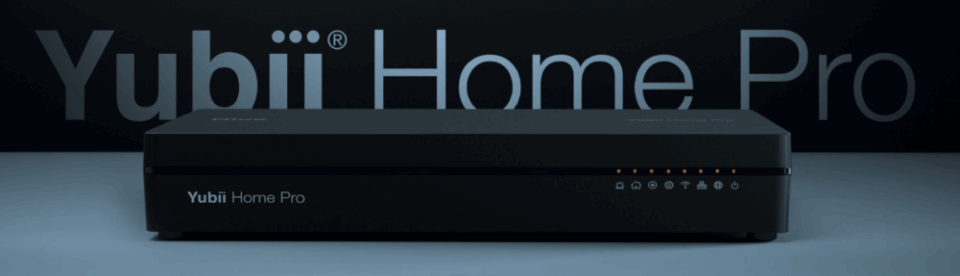
Yubii Home Pro is the direct result of this merger – connecting versatile smart technologies from Fibaro with the broad home automation ecosystem of the Nice brand. Essentially, it is a new and improved version of the popular Fibaro Home Center 3 hub, now under the Nice brand.
It keeps everything you loved about the Fibaro system but brings a more refined app, richer integration options, and support for a wider range of devices. If you are upgrading directly from Fibaro, you will instantly feel right at home, while for complete beginners, getting to know the system will literally be a breeze.
If you are already familiar with older Fibaro controllers, here is a quick summary:
⬛ Yubii Home Pro takes over the flagship position from the Fibaro Home Center 3 (HC3)
⬜ Yubii Home (without the Pro tag) serves as a direct replacement for the Home Center 3 Lite
Yubii Home Pro is designed to combine top-tier performance with maximum accessibility. Whether you are a DIY enthusiast or a professional integrator, this smart home hub will provide you with a robust platform that is relatively easy to set up.
Simply put, Yubii Home Pro is a small box that connects to all your smart devices (sensors, lights, thermostats, cameras, alarms, and anything else) and allows you to control them centrally. To manage everything, you can use the mobile Yubii app, voice commands, or automated scenes. It is designed as a comprehensive hub to unify your smart home devices regardless of the brand.
This isn't just another smart home hub – it's a major new player replacing the highly popular Fibaro Home Center 3. And you know what? It's even better.
What do you get?
🎛️ Control of more than 200 smart devices simultaneously
📡 Support for Z-Wave Plus, Zigbee, Wi-Fi, Ethernet, and Nice's own radio systems
🔒 Strong privacy protection and local control – your home works even during an internet outage
📉 Smart energy monitoring to help you lower your electricity bills
🗣️ Voice control via Alexa, Google Assistant, and Siri Shortcuts
🧩 Compatibility with over 3,000 smart products – lights, blinds, speakers, locks, and many more
Where Yubii Home Pro clearly stands out
🛡️ 1. Home Security
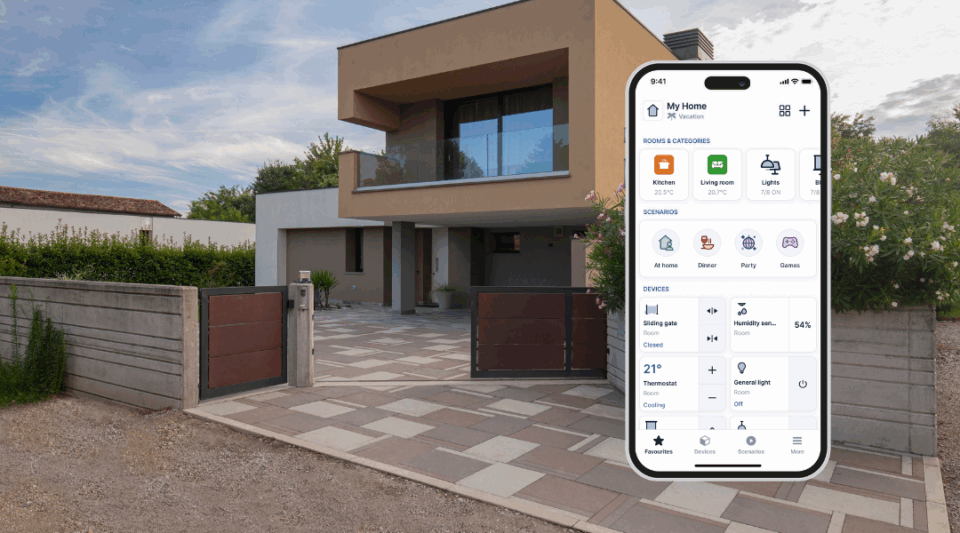
One of the strongest aspects of a smart home hub like Yubii Home Pro is home security. If home security is a priority for you, Yubii Pro has your back on several fronts.
1.1. Security System Integration
Yubii Home Pro works with a wide range of sensors and alarms. Motion detectors, window and door sensors, sirens, cameras, or smoke detectors – whether they are Fibaro and Nice devices, or from other Z-Wave manufacturers – can be linked into one cohesive security system. For example, Nice offers sensors like Motion-Control (which detects motion, temperature, and light levels) and Smoke-Control (smoke and heat detector), which communicate flawlessly with Yubii. If the system detects an intruder or smoke, Yubii can instantly trigger an alarm, send a notification to your smartphone, and even flash your smart lights red to warn everyone in the house.
1.2. Scenes and Automation
Since Yubii Pro allows you to create custom scenes, you can automate many security-related tasks. Going on vacation? Set up an "Away" scene: once activated, Yubii can simulate your presence by randomly turning lights on and off in the evening, moving motorized blinds, and if it detects motion outside, it can play the sound of a barking dog through a smart speaker. The possibilities are endless (and quite fun to create!). For more common and practical uses, you can set the system to automatically lock smart locks at midnight, or arm the alarm as soon as you tell Alexa "Good night".
1.3. Surveillance and Monitoring
Yubii Home Pro supports IP cameras and can integrate their video feed directly into the app. This allows you to monitor your security cameras from the same main dashboard in the Yubii app. Although the system doesn't replace a full-fledged NVR (Network Video Recorder), even this basic camera integration is great for a comprehensive overview of your home's security. And if any of the sensors are triggered while you're away, you will receive a push notification and can immediately check what the cameras captured via the app.
1.4. Reliability and Local Processing
Traditional alarms are known for their reliability, and Yubii strives to match them by processing critical functions locally. As mentioned earlier, even in the event of a temporary Wi-Fi or internet outage, all armed sensors and alarms will continue to function, as the hub processes everything on-site. This local autonomy is a massive plus for security – you definitely don't want your alarm to depend on a remote cloud server.
Furthermore, Yubii Home Pro uses encrypted communication for its sensors and controllers, making it significantly harder for potential attackers to tamper with your system. Data protection and cybersecurity are priorities for the Nice smart home platform, built in from the very foundation.
In short, Yubii Home Pro can serve as the central hub for a DIY security system that can rival some professional installations. Thanks to the combination of motion sensors, door alarms, and cameras coordinated by Yubii, you get comprehensive security protection. Plus, you can expand the system at any time – just add a flood sensor to detect water leaks, a carbon monoxide (CO) sensor, and so on, and Yubii will reliably process these alerts as well. The peace of mind of having it all under control right from your phone (or via voice) is a compelling reason why many invest in a smart home hub like this.
📉 2. Energy Management and Efficiency
Another key feature of Yubii Home Pro is energy management and home energy efficiency. The capabilities of this hub will help you save energy (and money) while maintaining maximum comfort in your home. Here’s how it works:
2.1. Smart Climate Control
Yubii Home Pro integrates with smart thermostats and air conditioning systems, optimizing heating and cooling. For instance, Nice offers devices like Clima-Control (for AC) and Warm-Control (for heating), which work with the Yubii hub to adjust temperature settings exactly based on your preferences. During winter, Yubii could automatically turn on the heating earlier if it detects a sharp drop in temperature at night, ensuring you wake up to a warm house without the heater having to run all night. Conversely, in summer, it can turn on the AC or a ceiling fan when the indoor temperature rises above 28 °C, but only if you are actually home – saving energy when the house is empty.
2.2. Blinds and Lighting Automation
One of the clever ways Yubii helps with efficiency is by automating blinds, curtains, and lighting. Yubii can work with motorized blinds (Nice manufactures motors for them, and Yubii natively supports Nice and Elero shading technology) to maximize natural light and reduce indoor overheating.
For example, Yubii can lower the blinds during the hottest part of the afternoon to keep the house cool, and raise them later to let light in as the sun's angle changes – all based on a time schedule or data from a light sensor. Similarly, with smart lighting, Yubii can ensure lights aren't on when they aren't needed: motion sensors can turn off lights in empty rooms, or an "All Off" scene triggered when leaving the house turns off all lights and appliances, reliably preventing energy waste.
2.3. Energy Consumption Monitoring
The Yubii app offers a customizable energy tracking feature. You can enter your electricity tariff (price per kWh) and let the system track how much power your connected devices are drawing. It's an excellent way to uncover the biggest energy "vampires".
For instance, if you plug your fridge or home theater system into a smart plug with power metering, Yubii will show you exactly how much these devices cost you every day. With this information, you can decide to adjust their usage – for example, scheduling the water boiler to heat only during off-peak hours (lower tariff), and so on. The app's energy dashboard thus helps you make informed decisions that can noticeably slash your bills.
2.4. Solar and Battery System Integration
Many households today use solar panels and possibly battery storage. Yubii Home Pro can integrate with certain solar inverters, such as Fronius, SolarEdge, or Huawei, as well as with smart thermostats or EV chargers, to optimize your self-consumption.
For example, if your solar system (like a Fronius inverter) reports a surplus of generated energy around noon, Yubii can automatically start the electric water heater or begin charging the battery. Conversely, it can delay starting the dishwasher until your solar system is generating power, instead of running it at night when you would be drawing electricity from the grid. This kind of smart energy flow management is a huge win for both overall efficiency and sustainability.
In short, Yubii Home Pro acts as your energy-saving assistant. It uses automation to prevent waste – turning off devices when not needed, utilizing the natural climate (sunlight, cool night air), and coordinating appliances to run as efficiently as possible. Over time, these optimizations can significantly reflect in lower electricity bills. Plus, it's eco-friendly, which is another nice bonus. And don't worry – all these automations run quietly in the background; you'll just notice a more comfortable home that somehow uses much less energy!
✨ 3. Smart Lighting and Comfort Scenes
Lighting is often the gateway into the world of smart homes, and the Yubii Home Pro system truly shines in this area (literally). It allows not only smart control of lights but also the creation of comfort scenes for the whole home, making daily life more convenient and enjoyable.
3.1. Unified Lighting Control
With Yubii, you can connect various smart lighting systems – from Z-Wave switches and dimmers (Fibaro, Aeotec, etc.) to popular smart bulbs like Philips Hue and others. Instead of switching between different apps for different lights, Yubii Home Pro groups them all into one clean dashboard. You can group lights by rooms, create one-tap actions to turn off all living room lights, or use a quick scene to change the mood lighting color for movie night. Everything is centralized and easy to manage via the app or voice commands ("Alexa, set the living room lights to 20%"). Guests will be amazed when you completely transform the atmosphere of your entire home with a single button or phrase.
3.2. Custom Scenes for Routines
This is where the real fun with Yubii begins – creating scenes that link lighting with other devices. For example, a "Good Morning" scene can open the smart blinds, slowly fade up the bedroom lights, start the coffee maker (via a smart plug), and even play your favorite morning playlist on a connected speaker. All this with a single tap or timed to the sunrise.
How about a "Home Theater" scene? With Yubii, you can dim the lights, close the curtains, turn on the TV and AV receiver, and set the thermostat to a cozy temperature – instantly creating a cinema atmosphere right at home! Since Yubii Home Pro can communicate with so many types of devices (lighting, audio/video equipment via IR controllers, thermostats, etc.), the only limit is your imagination.
3.3. Voice and Gesture Control
Sometimes you just don't want to pull out your phone. Yubii integrates with voice assistants, so you can easily ask Google or Alexa to activate any of your scenes or turn individual lights on and off. If you use Apple devices, you can also set up Siri Shortcuts to trigger Yubii scenes.
In addition, Fibaro devices are supported, such as The Button or Swipe (gesture controller) – which means you can, for example, double-press a wireless button by your bed to start the Good Morning scene, or wave your hand over the panel to switch between lighting presets. It's all about providing you with natural and convenient ways to control your environment.
3.4. Adaptive Lighting and Comfort
If you like to experiment, Yubii Home Pro also supports more advanced logic. In the Yubii interface, for instance, you can use LUA scripting or block scenes to set up adaptive lighting. This could mean your smart lights automatically adjust their color temperature based on the time of day (cool white during the day for focus, warm in the evening for relaxation). Or the lights can sync with sunrise and sunset times (the hub knows your location and local sunrise/sunset times after initial setup).
Another comfort feature: if you have motorized awnings or patio lighting, you can automate them to extend or turn on at dusk (when you're likely to use the outdoor space), and retract or turn off at midnight in case you forget. Thanks to Yubii's flexibility in scheduling and sensor-triggered rules, implementing these tweaks for a more comfortable life is very straightforward.
Essentially, smart lighting with Yubii Home Pro goes beyond just basic convenience – it's about creating the right atmosphere exactly on command. From practical needs (like ensuring all lights turn off when you leave to save energy) to lifestyle benefits (setting scenes that impress guests or help you unwind), Yubii handles it all with elegance. And since everything is unified in one system, you avoid the fragmentation that sometimes frustrates smart home users.
Yubii Home Pro vs. Yubii Home (known as Fibaro HC3 Lite)
What is the best smart home hub? Yubii Home Pro is absolutely the top candidate. Here is why:
Pros:
🌐 Versatility: Supports a wide range of devices – Z-Wave, Zigbee, Wi-Fi, Nice radio protocol, and more. Thanks to compatibility with thousands of products, you won't feel locked into just one ecosystem.
⚡ Performance: Easily handles even large systems (over 200 devices), making it an ideal choice for large homes or more advanced smart home installations.
🛡️ Privacy and Local Control: Automations run locally, so they do not require a constant internet connection, and all your data is securely protected.
📱 User Experience: The new Yubii app is clean, intuitive, and easy to navigate. Even more complex tasks, like adding devices or creating scenes, are much simpler thanks to step-by-step guides. Voice assistant integration is also seamless.
📈 Active Development: The Yubii system is regularly updated and has a strong community around it (especially from the Fibaro user base). Moreover, backed by Nice, it is highly likely this system will continue to grow and improve in the coming years.
Cons:
💰 Higher Price: Yubii Home Pro is not among the cheapest options. If you have a smaller home or just a few smart devices, the standard Yubii Home or a simpler hub might suit your needs – and budget – better.
⚙️ Learning Curve for Advanced Features: Basic usage is simple, but if you want to dive into advanced scripting or custom integrations, it requires some patience to learn. For tech-savvy users, this isn't a downside, but casual users might not utilize these features to their full potential.
🔄 Transitioning to a New Ecosystem: If you are migrating from an older Fibaro system, keep in mind that some new features (like Zigbee support) are still being fine-tuned through firmware updates. The new Yubii app also had a few bugs in its early days, though most have already been ironed out. The main advantage? You won't have to learn everything from scratch – most core functions remain familiar, and the improvements are definitely worth it.