
🧠 Homey Flows: How to Create Smart Automations Without Programming
Homey Flows represent a simple yet incredibly powerful way to automate your smart home—without the need for technical skills or programming. Thanks to an intuitive interface, users can create logical "if–then" scenarios that connect various devices, sensors, and services into one cohesive system.
🔄 What Are Homey Flows?
A Homey Flow is a set of rules that dictate what your smart home should do in specific situations. Every Flow consists of three parts:
- When – the event trigger (e.g., turning on a light, arriving home, a timer)
- And – an optional condition (e.g., only if it's dark or no one is home)
- Then – the action Homey must perform (e.g., turn on the heating, send a notification)
Example:
👉 When the front door opens
👉 And the time is past 8:00 PM
👉 Then turn on the hallway light and play music
💡 Practical Use Cases
🏠 Arriving Home
- When your phone connects to the home Wi-Fi → the lights turn on, the temperature adjusts, and the radio or Spotify starts playing.
🌅 Morning Routine
- At 6:30 AM on weekdays → turn on the bedroom light, start the coffee maker, and play the morning news.
🔐 Night Mode
- At 10:30 PM → turn off all lights, lock the smart lock, and set the thermostat to eco mode.
🚪 Security Mode
- When nobody is home and a sensor detects motion → send a notification, trigger the alarm, and turn on all the lights in the house.
🌡️ Energy Saving
- If the room temperature exceeds 24 °C (75 °F) → turn off the heating or turn on the fan.
📱 How to Create a Flow?
- Open the Homey app (mobile or web version)
- Go to the "Flows" tab
- Click "+" and select the event trigger ("When")
- Add optional conditions ("And")
- Set the output action ("Then")
- Save and activate the Flow – the system works instantly
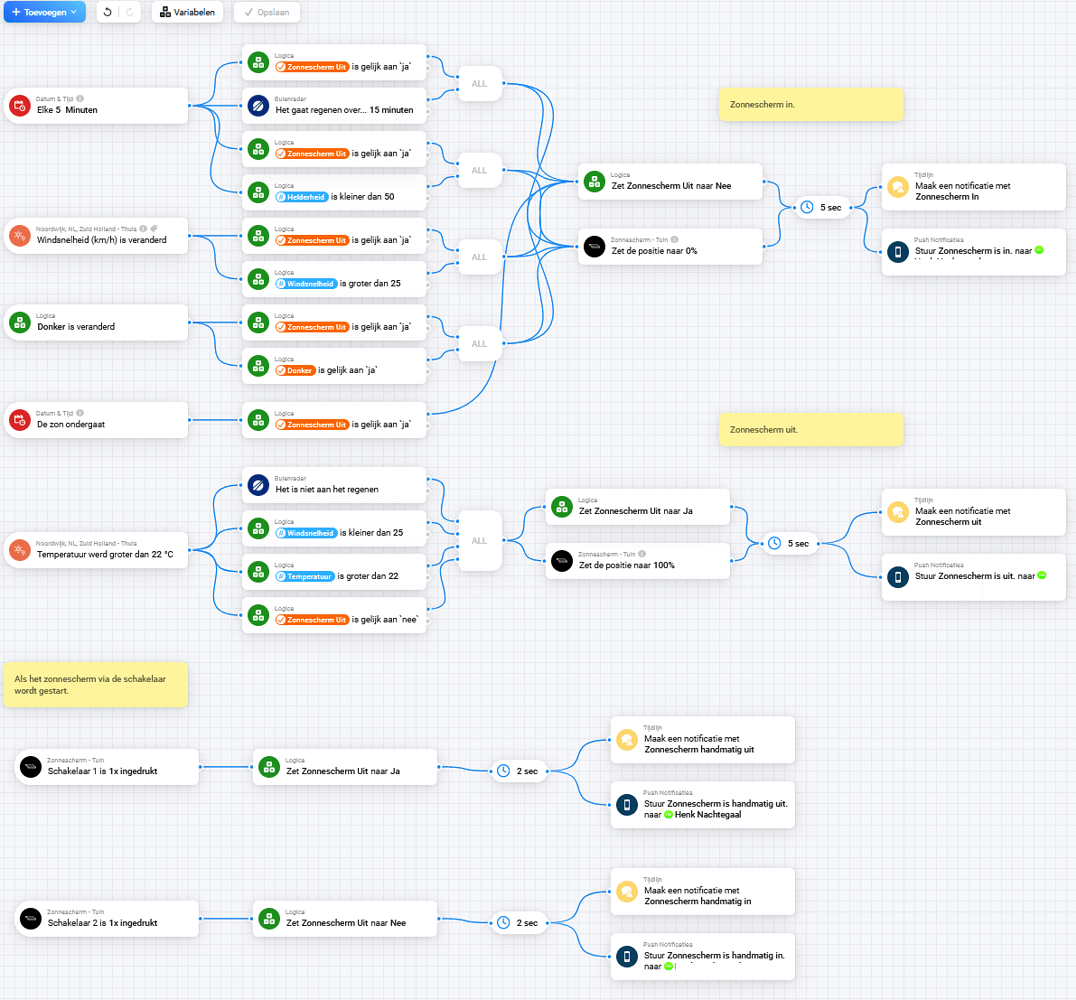
🔧 Advanced Features: Advanced Flows
For more demanding users, Homey offers Advanced Flows, which allow:
- Using multiple conditions simultaneously
- Logic branching (IF, ELSE IF, OR)
- Countdowns, delays, and timers
- Working with variables, device states, and complex automations
Advanced Flows are ideal for multi-level security scenarios, zone heating, or complex lighting control based on multiple inputs (e.g., time, motion, light intensity).
🧰 Recommended Devices for Homey Flows
Homey supports hundreds of brands and thousands of devices. The most popular ones include:
- Shelly – switches, relays, sensors, thermostats
- Aqara – motion, door, and vibration sensors, buttons
- Fibaro – Z-Wave motion, flood, and smoke sensors, relays, and dimmers
- NOUS – LED strips, smart bulbs, plugs, sensors, water valves
- Sonos – audio zones and speakers
- HeatIT, LinkedGo Smart HVAC Thermostat, Netatmo Thermostat – thermostats and heating control
- Somfy – blind and roller shutter control
- Zigbee, Z-Wave, Wi-Fi, IR, Bluetooth – all major smart home standards
✅ Benefits of Using Homey Flows
- 🔄 Simplicity – a clear "if–then" interface
- 🧩 Versatility – connects devices across different brands without restrictions
- 🧠 Intelligence – reacts to real-life conditions, not just a button press
- 📱 Remote Control – via the mobile app or voice assistants
- ☁️ Cloud & Local Support – secure and flexible
- 🛠️ Flexibility – easy to modify without reconfiguring the entire system
- 🎯 Precise Targeting – automate based on time, person, location, or device status
📌 Tips for Efficient Use
- ✅ Use variables (e.g., "someone is home") to create more flexible Flows
- ✅ Combine time and sensor conditions for higher accuracy
- ✅ Group multiple Flows into Advanced Flows for complex logic
- ✅ Regularly test your Flows to catch changes in devices or their availability
- ✅ Use the "test flow" feature before deploying a new automation
📝 Conclusion
Homey Flows empower you to turn your house into an intelligent environment that adapts to your habits, the time of day, and current conditions. Whether you're a beginner or an experienced smart home enthusiast, Homey provides a powerful yet user-friendly tool to master even advanced automations.
Start with simple scenarios—and soon your home will literally "read your mind."