
Which Smart Home System is Right for You?
Choosing the right system is the most important thing you have to do when you start building a Smart Home. It is very tempting to dive into building a Smart Home using the cheapest components available, but this often turns out to be the most expensive decision. Quite often, the product portfolio of the manufacturer you chose isn't comprehensive enough to fulfill everything you want from the system. Let's talk about the process you should follow to choose the right Smart Home system for you.
Step 1 - Sit down and write everything down
Planning is crucial when building a Smart Home. Even if you "only" want a smart plug for now and will see what comes next, it is important to think about what kind of system might eventually evolve from it. Yes, for some, "just" a smart plug means they will never need anything else. In that case, there is nothing to debate—grab the cheapest one that has the required functions and you're done. But if you are like most people, believe me when I tell you that a smart home is addictive. Once you start and realize that a Smart Home is not just a toy, but a way to save money, simplify daily chores, or improve the climate in your house, you will find it very hard to resist expanding it.
So, in the first step, planning is vital, and you need to let your imagination run wild. Don't even think about money; just imagine everything you would want in your house/apartment if there were no limits. Does it bother you that lights are left on? Would a motion sensor help? What about heating, is it managed efficiently? Do you have blinds that could be automated? Wouldn't it be nice to have a "leave home" button to turn everything off when you walk out the door? What about cameras or video doorbells—do you ever miss a package just because the courier couldn't reach you at home? How about irrigation for the lawn or greenhouse? Managing excess solar energy?
There is a lot a Smart Home can do, and it's not just about convenience, but also safety, such as monitoring air quality and managing ventilation, detecting water leaks, and shutting off the main water supply. Not all systems can handle all of these.
In this step, I recommend creating a spreadsheet where you list the required features row by row. You don't need to put them in any specific order—just write down whatever comes to mind. Really go all out and dream a little. You can download a template spreadsheet to use right here: Plan_smart_home.
As I mentioned, don't let finances guide you just yet. Of course, they are important, but at this stage, they don't carry as much weight. Right now, you just need a solid idea of what the system must be able to do so it won't limit you in the future and force you to replace the entire central hub. The expenses don't have to come all at once; building a Smart Home, especially a wireless one, can be spread out over several years. That makes the investment much less "painful." And in the end, it hurts less than investing in something you ultimately won't use because you are forced to switch to a different, better system.
Step 2 - Rank everything by importance
The second step acts as a filter. There is no system on the market that does everything, costs very little, and can be installed anywhere. Therefore, it is important to know which features are absolutely essential for you and which are just the cherry on top. My recommendation is to take your spreadsheet and in the second column, next to the features, assign points from 1 to 10, where 1 means the least important feature and 10 means a critically essential feature you require. While filling out the table, feel free to keep adding things that come to mind. For example, if you list lighting control and give it 8 points, you might also want to add how important it is to have full control over the RGB LED strip in your living room.
The practical result of this step is a table containing all the features you need, along with their "grade" of importance. That is all you need here.
Step 3 - List the systems you are considering in the next columns
Now we get to the important part: selecting a system that handles as much of what's important to you as possible. This step will take the most time, as you will have to dig into the capabilities of different systems. It's important to note that a system requiring a central hub shouldn't automatically be considered overpriced. You must realize that if you opt for a WiFi Smart Home like Shelly, but calculate that you will eventually need around 35 devices, then instead of buying a smart home hub, you will need to invest heavily in a high-quality WiFi router. Relying on the basic router provided by your internet service provider to perform miracles is not a good idea. To handle 35 IP addresses and constant communication, you really need to look into a powerful router. Or, you can simply choose a hub-based system like FIBARO and let the hub handle all the heavy lifting, as it was built for exactly that.
But let's get back to our table. Do a basic overview of the systems, for example by browsing our e-shop, and write the systems you find appealing into the following columns. I definitely recommend looking into FIBARO, Homey, Aqara, SmartThings, and Shelly. Of course, if you want, you can build the entire system on an open-source platform like Home Assistant... but in that case, I suggest adding a row to your table rating how important the time required for system maintenance is to you.
Step 4 - Meticulous work and verifying functionality
Now we come to the core task, which is also what usually takes us the most time: finding out which features are supported by which system and how. This often means verifying whether a given system offers products for a specific function. Sometimes there are workarounds—for example, Shelly doesn't offer a dedicated main water shut-off valve, but you can solve this using an electric solenoid valve and a relay. However, this is a slightly complicated workaround for a simple problem. At the same time, if we were to go into such extreme detail and look for workarounds at this stage, the whole table would lose its meaning. I recommend taking it exactly as it is—either the system natively supports it, or it doesn't.
Here it is important that you mark supported features with a value of 1 and unsupported features with a 0!
If you used the spreadsheet I attached to this article, the calculations will be done automatically. If you created your own table, simply use a formula: sum of the rows (Importance × System Support). So, for example, if you gave cameras an importance score of 8, and the Shelly system does not support cameras, the result for this feature in Shelly will be 8 × 0 = 0. If the FIBARO system supports it, the result will be 8 × 1 = 8 points. Finally, you sum up all the points.
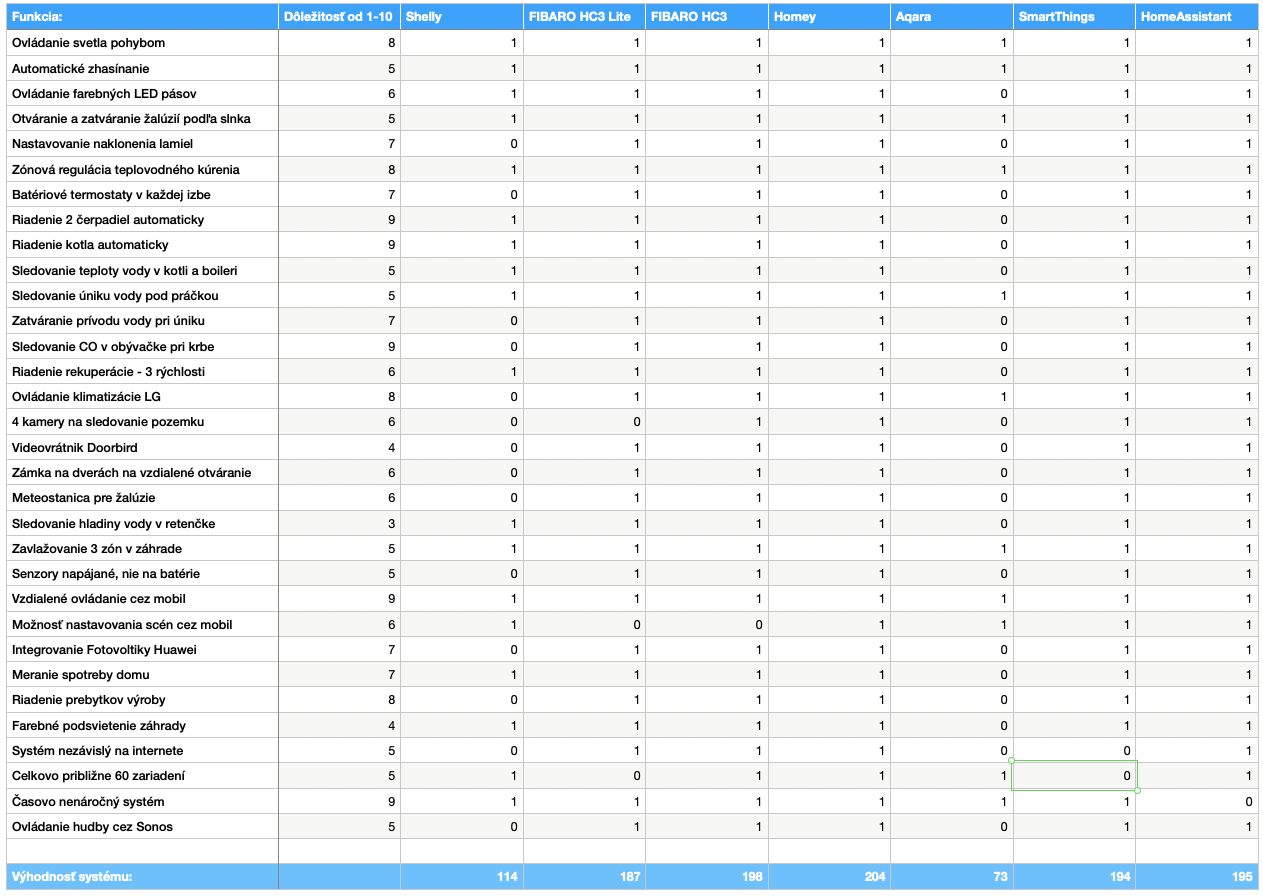
After correctly filling out the table, you will get the resulting score for each system. For me, the results looked like this:
Step 5 - Evaluation and adding the price factor
I will use my own calculation for the evaluation. Do not take it as a universal truth; it is just my personal breakdown of features for easier understanding. As you can see, in my table, the Homey system came out on top (note: the calculation in the table is for Homey PRO, not the Homey Bridge!). The total score is 204 points, followed by FIBARO Home Center 3 in second place, and then SmartThings. For me, time is very valuable, which is why I would completely eliminate the open-source system, even though it placed 3rd in the comparison.
Now I will add the price factor to this whole calculation. Since I have 3 winning systems, I will compare the prices of the central hubs and the components. In my case, it works out beautifully because all the top-scoring systems can use practically identical products. All three can work with Z-Wave, Zigbee devices, and even WiFi.
When comparing the prices, we get this result:
- Homey PRO - 204 points, price €399
- FIBARO HC3 - 198 points, price €684
- SmartThings - 194 points, price €109
Step 6 - The Decision
And we are at the end. Now it all comes down to our decision. You can certainly see that the table doesn't give a definitive answer, because system prices and availability play a major role. For example, the Homey PRO has been highly anticipated for months at the time of writing, but remains unavailable.
What the table did tell us, however, is which direction we definitely shouldn't go. Again, don't take the table's outcome as an absolute rule, because systems like Shelly and Aqara suit many users perfectly. But if my table represented my true needs, I would know that I can confidently cross off those two systems, because they lack the most features required for my specific use case.
Now it is up to you. Look at your calculations once more. You can change the scale from 1-10 points to 1-20 points to further separate highly important features. As an example, even though SmartThings came out the cheapest, a major disadvantage for me is that it's a cloud-based solution, and I don't have a perfectly stable internet connection. Also, if you need a solution right now, the unavailability of Homey might make the decision for you. Or, if the budget is strictly tight and you don't want to invest €684 right away, you can eliminate FIBARO HC3 from the table and practically add FIBARO HC3 Lite to your decision pool instead.
Step 7 - The Purchase
The next step is purchasing the system and devices. Here, we will be happy to help you :) You can buy the devices directly through our e-shop, or contact us and we will find an installer to set up the entire system for you.
A Final Request:
Real-world data is important for us, and surely for you as well. That means spreadsheets with actual calculations that can be used as examples. We would be absolutely thrilled if you sent your calculation tables to our email so we can publish them as real-world examples in this article.