
Your electricity bill arrives once a year and does not tell you what actually uses the most. A Shelly 3EM, Pro 3EM or EM Gen3 smart energy meter goes into the distribution board and shows whole-home consumption in real time on your phone, per phase, day and month. With solar panels it also measures how much you export to the grid and can trigger automations when you have a surplus. Everything runs over Wi-Fi in the Shelly Smart Control app, with no hub. This article explains which model to choose, how it is wired and what to do with the data.
In short: what you need to know
- Three phases = 3EM, one phase = EMA house with a three-phase supply needs a 3EM or Pro 3EM. A single-phase flat is covered by the EM Gen3.
- 63 A or 120 AThe 3EM-63 Gen3 measures up to 63 A per phase and mounts on a breaker. The Pro 3EM with 120 A clamps is DIN-rail, has LAN and stores 60 days of data.
- Solar: consumption and exportThe 3EM and Pro 3EM measure in both directions, so you see what you draw from and send to the grid.
- Installation by an electricianThe meter goes into the main distribution board. The app setup you can then do yourself.
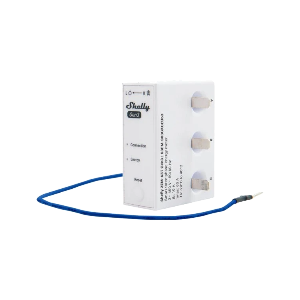 Shelly 3EM-63T Gen3Three phases up to 63 A, mounts on a breaker.€69.99
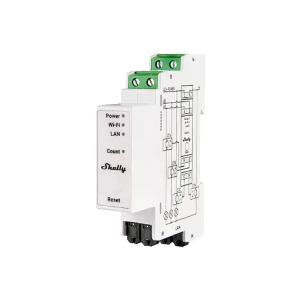 Shelly Pro 3EM 120A v2Three phases up to 120 A, DIN rail, LAN.€139.00
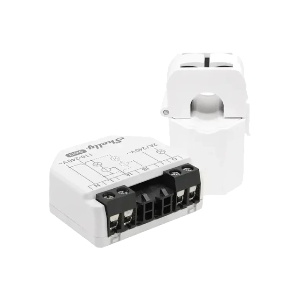 Shelly EM Gen3 + 50ASingle phase, two channels, contactor output.€66.90
What energy monitoring gives you
The utility meter shows a single number. A Shelly smart meter measures each phase separately and the app shows instant power in watts, voltage, current and consumption in kWh per hour, day and month. In practice this means:
- You find silent energy hogs. Look at night-time consumption when everything is asleep. If the house still draws hundreds of watts, something is running needlessly (an old freezer, a circulation pump, heating).
- You see phase loading. If one phase carries the hob, oven and water heater, switching them on together can trip the breaker. Monitoring shows where the problem is.
- You know what running costs are. Enter your price per kWh in the app to see daily or monthly costs and compare what a new appliance or different heating settings brought.
- With solar you see export. The meter shows when you send energy to the grid and can switch on an appliance to use it at home instead.
Which Shelly energy meter to choose
Three questions decide: how many phases your supply has, how big the main breaker is and where the meter will be connected. The data below comes from Shelly technical documentation.
Shelly 3EM-63 Gen3: the simplest option for a house
A three-phase meter with built-in current transformers: each phase conductor passes through an opening in the meter (up to 8 mm), so no separate clamps are needed. It measures up to 63 A per phase with ±1 % accuracy, in both directions (four-quadrant), and stores 7 days of one-minute data. It connects via Wi-Fi and Bluetooth and can also monitor three separate single-phase circuits. The 3EM-63T mounts below the breaker with terminals; the 3EM-63W has wire leads and goes above or below the breaker.
Shelly Pro 3EM: DIN rail for the board, with LAN
The Shelly Pro 3EM 120A v2 is a DIN-rail module with separate 120 A current clamps that simply clip around the phase conductors without breaking the circuit. Besides Wi-Fi it has Ethernet (LAN), accuracy class B, bidirectional metering, 60 days of data storage, and the v2 also supports Modbus. It suits larger supplies, solar, EV chargers and places where you want a stable wired connection. It has no built-in relay; a Pro 3EM Switch Add-on is used to drive a contactor.
If 63 A is enough and you want a DIN-rail Pro with LAN, there is the Shelly Pro 3EM-3CT63 with three smaller 63 A transformers (9 mm opening).
Shelly EM Gen3: a single-phase flat
The Shelly EM Gen3 + 50A measures one phase and has two channels. The first 50 A clamp is in the box and measures the whole flat; you can add another clamp to the second channel later (for a water heater or solar inverter, for example). The manufacturer states up to 80 A with a compatible clamp. It also has a volt-free output (240 V~, 2 A) that can drive a contactor coil, for example for a water heater. It stores 10 days of data, connects via Wi-Fi and Bluetooth and even fits in a wall box.
Shelly EM Mini Gen4: one circuit up to 16 A
The Shelly EM Mini Gen4 is not for the whole house. It goes into one circuit up to 16 A (3,840 W), for example the kitchen socket circuit or a washing machine, and fits in a wall box. It has Wi-Fi 6, Bluetooth, Zigbee and Matter. It complements a 3EM when you want to know how much of the total goes to a particular circuit.
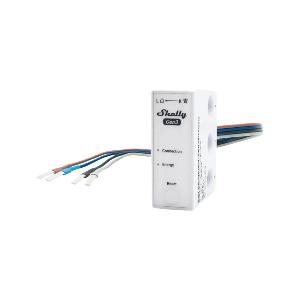 Shelly 3EM-63W Gen3Like the 3EM-63T, with wire leads.€75.90
 Shelly Pro 3EM-3CT63Pro for DIN rail, LAN, 3× 63 A.€110.00
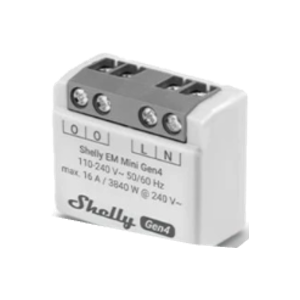 Shelly EM Mini Gen4One circuit up to 16 A, wall box.€19.45
Model comparison table
| Model | Phases | Max. current | Mounting | LAN | Solar export | On-device data | Price |
|---|---|---|---|---|---|---|---|
| 3EM-63T / 63W Gen3 | 3 (or 3× 1) | 63 A | on breaker | no | yes | 7 days | €69.99 |
| Pro 3EM 120A v2 | 3 | 120 A | DIN rail | yes | yes | 60 days | €139.00 |
| Pro 3EM-3CT63 | 3 | 63 A | DIN rail | yes | yes | 60 days | €110.00 |
| EM Gen3 | 1 (2 channels) | 50 A, up to 80 A | wall box / board | no | yes (1 phase) | 10 days | €66.90 |
| EM Mini Gen4 | 1 circuit | 16 A | wall box | no | – | 10 days | €19.45 |
- House, main breaker up to 3× 63 A, keep it simple: 3EM-63T Gen3.
- Solar, EV charger, you want LAN or Modbus: Pro 3EM 120A v2.
- Single-phase flat: EM Gen3. One specific circuit: EM Mini Gen4.
All Shelly lines (Gen3, Gen4, Pro, Wave) are compared in Shelly Gen3 vs Gen4 vs Pro vs Wave.
Where and how the meter is wired
To measure the whole house the meter must sit after the main breaker in the house distribution board, before all circuits. With solar, it measures at the point where the house connects to the grid, so that all consumption and everything the inverter exports passes through it. Otherwise the meter would not see export.
| Model | How it measures current | What else to connect |
|---|---|---|
| 3EM-63 Gen3 | phase conductors pass through openings in the meter | phase voltages L1, L2, L3 and neutral N |
| Pro 3EM | clamps (current transformers) clip around the phase conductors | supply and voltage sensing L1–L3, N, protection max. 16 A |
| EM Gen3 | clamp around the phase conductor (second optional) | L and N for supply and voltage sensing |
Clamps have an arrow for current direction. It must point from the grid towards the loads, otherwise consumption shows as negative. Always put the clamp around a phase conductor, never around the whole cable with the neutral (the currents would cancel out). On the 3EM and Pro 3EM the current and voltage of each phase must match: the clamp on L1 belongs to voltage input L1.
Safety: Installation in the house distribution board must be done by a qualified electrician with the main breaker off. The manufacturer specifies B or C protection of at most 16 A for the Pro 3EM supply and a 63 A breaker for the 3EM-63 Gen3. Never touch the sealed section before the utility meter.
Step-by-step setup in the app
1. Add the meter to the app
After switching the breaker on, open Shelly Smart Control and add the device. It is found via Bluetooth and you connect it to your 2.4 GHz home Wi-Fi. With the Pro 3EM you can plug in a LAN cable instead. Update the firmware straight away.
2. Choose the metering mode
On the 3EM and Pro 3EM keep three-phase mode when measuring the whole house. Use single-phase mode (three separate circuits) only when you measure three different single-phase circuits.
3. Check the readings
Switch on a known appliance such as a kettle (around 2,000 W). Power on one phase should rise by roughly that amount and be positive. Voltage should be around 230 V on each phase.
4. Set your electricity price
Enter your price per kWh from your bill in the settings. The app then shows costs alongside kWh.
5. Look at the charts
The device detail shows consumption per hour, day and month, and with bidirectional metering also energy returned to the grid. In the first week, pay attention mainly to nights and weekends.
6. Add alerts and scenes
Create a scene with a power condition, for example a notification when a phase exceeds a certain value. Ideas are in the automations section below.
Tip: The utility meter and the Shelly will never agree to the kilowatt-hour, but the difference should be small. If they differ a lot, check clamp direction and phase assignment. Billing always uses the utility meter.
Solar: export and surplus
The 3EM-63 Gen3 and Pro 3EM measure in four quadrants, so they separate energy drawn from the grid from energy fed into it. The app shows how much you exported on a sunny day and how much you took back in the evening, which makes it easy to see when an appliance is better run during the day.
- Signed instant power: when the phase total is negative you are exporting. That is the signal for automation.
- EV: for the Pro 3EM the manufacturer states that scripts and webhooks can adapt charging to solar surplus. This requires a charger that supports such control.
- Production metering: to see panel production itself, a single-phase inverter can be measured on the second EM Gen3 channel with another clamp.
A Shelly meter does not replace the meter supplied by your inverter manufacturer for export limiting. If your inverter has its own export-limiting meter, keep it connected and use the Shelly for monitoring and automations.
Automations that save money
Scenes in the Shelly Smart Control app can use the power measured by the meter as a condition and trigger an action on another Shelly device. All in one app, with no hub:
- Solar surplus → switch an appliance on. When power stays negative (for example below −1,500 W), a Shelly 1PM Gen4 with a contactor for the water heater or a Shelly Plug M Gen3 with a dehumidifier or charger switches on. When the surplus ends, it switches off.
- Phase overload → alert. A phone notification when the current on a phase exceeds a value close to the main breaker rating. Even better, automatically switch off a less important appliance.
- Night consumption → check. If the house draws more than usual at 3 am you get an alert. It reveals forgotten heating, a faulty fridge or a pump that never stops.
- Off-peak → heating. On a dual tariff, run the water heater or washing machine on a schedule only during off-peak hours and check in the charts that it really happens.
Careful with high-power loads: do not switch a water heater or heating through a plug. A continuous heavy load needs a contactor in the board, with its coil switched by a Shelly 1PM Gen4 or the EM Gen3 volt-free output (2 A). Leave design and wiring to an electrician.
If you use Home Assistant, Shelly meters are added through the Shelly integration on your local network and the data can feed the Energy dashboard. The Pro 3EM v2 also supports Modbus and MQTT.
Ready-made kits with prices
Whole-flat consumption overview and a smart plug that a scene can switch off at high load or on during off-peak.
- Shelly EM Gen3 + 50A€66.90
- Shelly Plug M Gen3€12.39
All three phases measured at the breaker and a relay that switches the water heater via a contactor by tariff or surplus.
A DIN-rail Pro 3EM with LAN measures consumption and export; the relay switches the water heater on when panels produce more than the house uses.
All kits run in one app, Shelly Smart Control, over Wi-Fi with no hub. The contactor and board installation are handled by an electrician. More meters are in the category Energy meters.
Troubleshooting
- Consumption shows as negative. The clamp is reversed. The arrow must point from the grid to the loads. With solar, a negative value is fine while you are exporting.
- Power on a phase is implausibly low or erratic. Clamp L1 is probably paired with voltage from another phase. Match each clamp to its correct voltage input.
- Current is near zero although appliances are running. The clamp surrounds the whole cable including neutral. It must go around the phase conductor only.
- The meter often goes offline. The board is often metal and far from the router. Use LAN on the Pro 3EM, or add a Wi-Fi access point closer to the board.
- Data is missing in the chart. The device stores data itself (3EM-63 Gen3 7 days, Pro 3EM 60 days) and fills the gap once the connection returns, provided the outage was not longer.
- Readings differ from the utility meter. A small difference is normal. A large one means wrong wiring or some circuits bypass the meter (for example a separately fused water heater before it).
Frequently asked questions
What is the difference between the Shelly 3EM-63 Gen3 and the Shelly Pro 3EM?
The 3EM-63 Gen3 has built-in current transformers up to 63 A, mounts on a breaker and connects via Wi-Fi. The Pro 3EM is DIN-rail, uses separate clamps (120 A or 63 A), also has LAN and stores 60 days of data.
What is the difference between the 3EM-63T and 3EM-63W?
They measure the same. The 63T mounts below the breaker with terminals; the 63W has wire leads and fits above or below the breaker.
Do I need a hub for a Shelly meter?
No. The meter connects directly to Wi-Fi (the Pro 3EM also via LAN) and is managed in the Shelly Smart Control app.
Does the Shelly 3EM measure solar export?
Yes. Both the 3EM-63 Gen3 and Pro 3EM measure in four quadrants, i.e. import and export. The meter must sit at the point where the house connects to the grid.
Can I install a Shelly 3EM myself?
Installation in the house distribution board is for a qualified electrician. Connecting to Wi-Fi and the app setup you can do yourself.
Is the Shelly EM Gen3 enough for a flat?
For a single-phase supply, yes. A 50 A clamp is included and a second clamp for a separate circuit can be added to channel two.
How long does the meter keep data without internet?
According to the manufacturer, 3EM-63 Gen3 up to 7 days, EM Gen3 10 days and Pro 3EM 60 days at one-minute resolution.
Can a Shelly meter switch something on?
The EM Gen3 has a 2 A volt-free output for a contactor coil. The 3EM-63 Gen3 and Pro 3EM have no relay; switching is done by a scene with another Shelly such as the Shelly 1PM Gen4.
Does the Shelly 3EM work with Home Assistant?
Yes, through the Shelly integration on the local network. The data can feed the Energy dashboard. The Pro 3EM v2 also supports Modbus and MQTT.
How accurate is the Shelly 3EM?
The manufacturer states ±1 % accuracy in the normal current range and class B for active energy on the 3EM-63 Gen3 and Pro 3EM. Billing still uses the utility meter.
Whole-home consumption on your phone
One meter in the board, per-phase overview and automations for solar surplus. No hub, all in the Shelly app.
See energy meters