
MOES ZHUB-W Zigbee Gateway with Wi-Fi for Tuya
Code: ZHUB-W-MS.png?6a0ecbfc)
.png?6adf33fd)
Related products


Product detailed description
Smart Zigbee Hub MOES ZHUB-W for Tuya and Smart Life 🏠
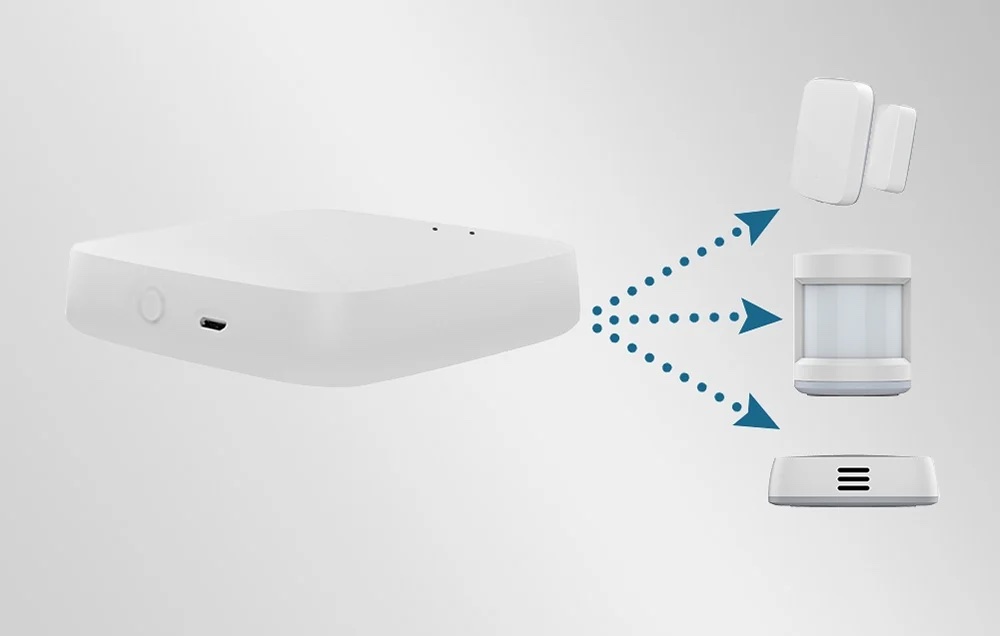
The MOES ZHUB-W gateway (manufacturer code ZHUB-W-MS) is the wireless Wi-Fi version of the MOES Zigbee gateway and the heart of a smart home built on Zigbee. Devices such as motion sensors, door sensors, flood detectors, switches or thermostatic radiator heads do not communicate directly over Wi-Fi. They need a Zigbee gateway that connects them to your home router and to the app on your phone. That is exactly what the ZHUB-W does: it connects to your router over 2.4 GHz Wi-Fi, with no cable, and on the other side handles up to 50 Zigbee devices.
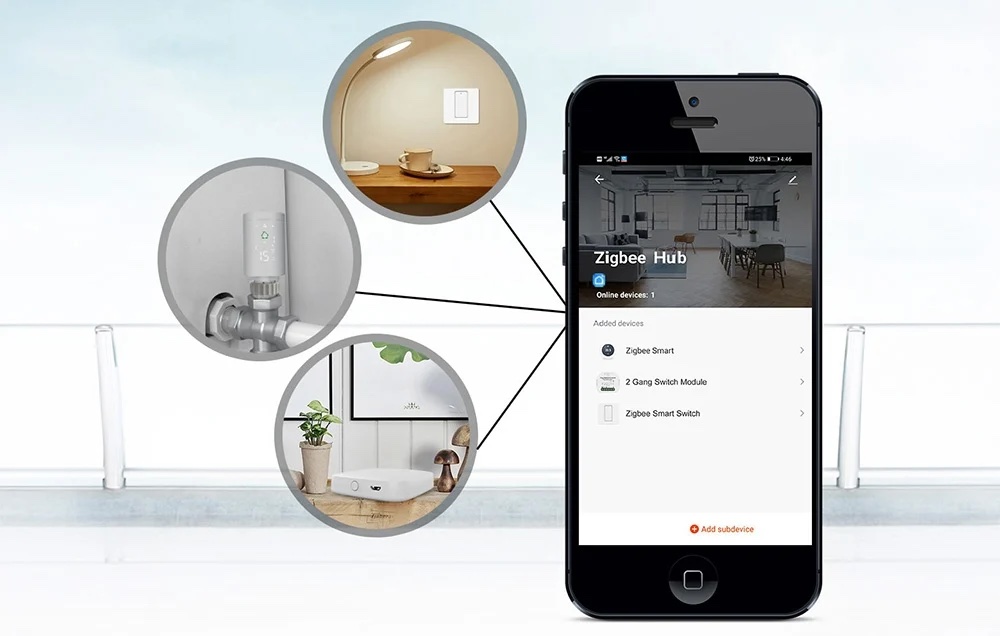
You then manage everything in a single Smart Life or Tuya Smart app, together with your Wi-Fi devices, cameras and smart plugs. Set up automations, get notifications about what happens at home and control your devices by voice.
One app for your whole home
The biggest advantage of the MOES Zigbee hub is that it brings different types of devices under one roof. The gateway itself handles Zigbee devices, but in the Smart Life app you see them next to your Wi-Fi plugs, cameras and lights and can link them together with scenes. When a door opens, motion is detected or water appears on the bathroom floor, you get a notification straight to your phone, whether you are at work or on holiday.
If you are just planning your smart home, take a look at our range of Tuya Zigbee products that work directly with the gateway.
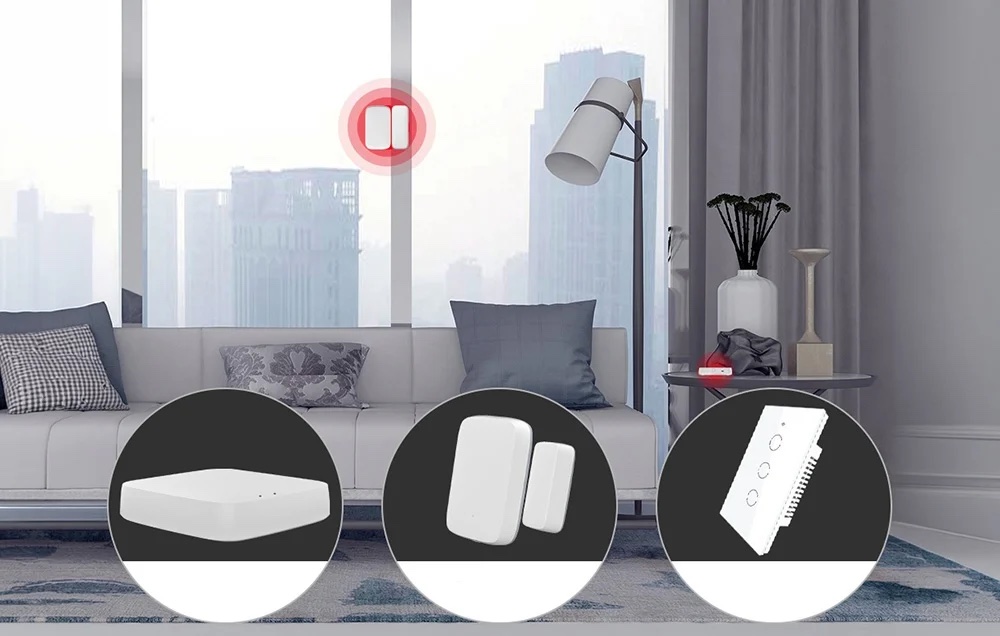
Automations that fit your day
With the ZHUB-W home gateway you can create scenes that follow your daily habits. When you get up at night, a motion sensor turns on dimmed hallway lights. Opening the front door switches the lights on, closing it turns them off after a while. Thermostatic radiator heads can turn the heating down when a door sensor detects an open window. According to the manufacturer, local automations between Zigbee devices keep working even when the internet goes down.
Zigbee 3.0 and up to 50 devices
The gateway supports the Zigbee 3.0 standard, which ensures wide compatibility and stable communication. Zigbee is also an energy efficient protocol: battery sensors typically last months or even years and do not load your Wi-Fi network with dozens of devices. Mains powered devices (e.g. switches, plugs) act as repeaters, so the network grows with every device you add. A capacity of up to 50 devices is enough for a typical apartment or family house.
The ZHUB-W is powered via Micro USB (5 V, 2 A), so you can place it anywhere within Wi-Fi range, ideally somewhere in the middle of your home for good coverage of all rooms.
Who is the gateway for
- Beginners who want an affordable and simple way to start with a smart home in the Smart Life or Tuya app.
- Renters who want wireless sensors and switches without touching the electrical wiring.
- Homes where the router is not where the gateway should be and you do not want to run a cable to it.
- Owners of MOES Zigbee thermostats who want to control them remotely.
- Households using Amazon Alexa or Google Home who want to control Zigbee devices by voice.
Use cases
- Night light with a motion sensor: the hallway or bathroom lights up on its own at night, no need to look for the switch.
- Home security: door and window sensors send you a notification when someone opens the door while you are away.
- Flood protection: a flood detector under the washing machine or boiler alerts you as soon as it detects water.
- Smart heating: Zigbee thermostatic radiator heads and thermostats controlled by schedules and open windows. 🌡️
- Voice control: “Alexa, turn off the living room” works for Zigbee switches and bulbs too.
Key features
- Zigbee 3.0: compatible with a wide range of Tuya and MOES Zigbee devices.
- Up to 50 devices: enough capacity for an apartment or family house.
- Wireless connection via Wi-Fi: no cable to the router needed, just power.
- Smart Life / Tuya app: Zigbee and Wi-Fi devices in one app.
- Automations and scenes: react to motion, opened doors, time or temperature.
- Local automations: Zigbee scenes keep running during an internet outage.
- Phone notifications: instant alerts about events at home.
- Voice assistants: works with Amazon Alexa and Google Home.
- Micro USB power: 5 V / 2 A, flexible placement in your home.
Technical specifications
| Parameter | Value |
|---|---|
| Manufacturer / model | MOES ZHUB-W (ZHUB-W-MS), wireless version |
| Dimensions | 65 × 65 × 15 mm |
| Power supply | 5 V / 2 A, Micro USB |
| Frequency band | 2.412 to 2.484 GHz |
| Max. transmit power | < +20 dBm |
| Max. number of devices | 50 |
| Indoor Zigbee range | approx. 10 to 30 m (depending on walls and obstacles) |
| Operating temperature | -10 °C to 45 °C |
| Operating humidity | 10 to 90 % RH (non-condensing) |
| Package contents | gateway, USB power cable, user manual |
Protocols and compatibility
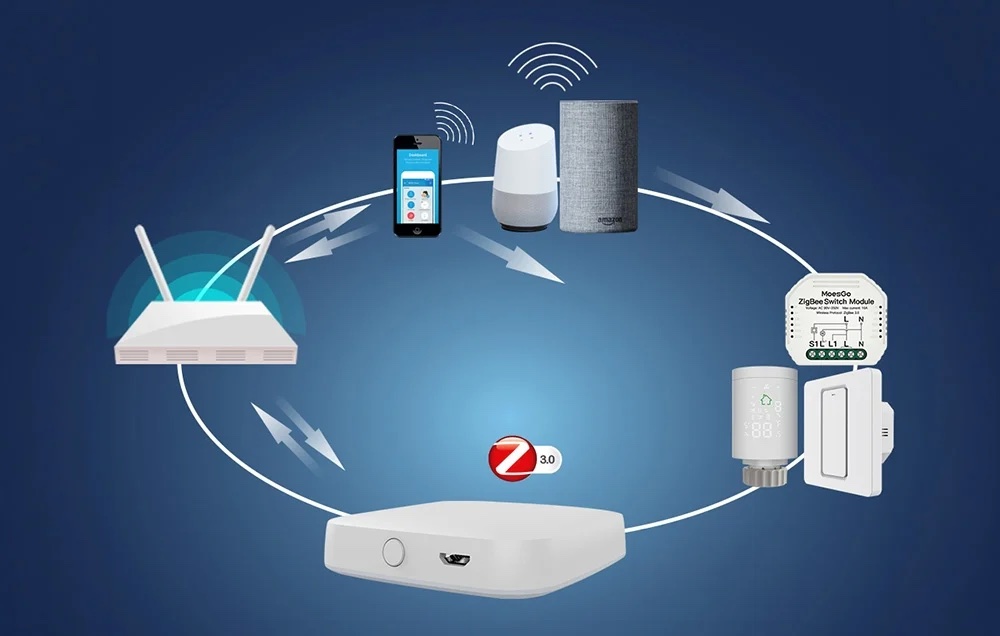
- Zigbee 3.0 (IEEE 802.15.4): connects Zigbee devices from the Tuya and MOES ecosystem, e.g. the MOES Zigbee Thermostat for Gas Boilers or the Thermostat for Electric Heating 16 A. Devices from other brands work reliably mainly when they are labelled as Tuya compatible.
- Wi-Fi 802.11 b/g/n: used to connect the gateway to your router, 2.4 GHz band only. 5 GHz networks are not supported.
- Smart Life / Tuya Smart: full support including automations, scenes and notifications. Remote control and notifications need the internet, local Zigbee automations run without it.
- Amazon Alexa and Google Home: voice control of connected devices after linking your Smart Life account.
- Home Assistant: only via the Tuya cloud integration, not as a local Zigbee coordinator. For a local Zigbee network in Home Assistant or Zigbee2MQTT, choose the Nous E16 Zigbee2MQTT USB Dongle instead.
- Bluetooth, IR, Ethernet, Matter, Thread: not supported by the ZHUB-W. Other MOES gateways offer these features, see the overview below.
Which MOES gateway to choose
MOES makes several gateways that look alike from the outside. To help you pick the right one, here is a quick overview:
| Model | What it is for |
|---|---|
| ZHUB-W (this product) | Zigbee 3.0, wireless connection to the router via 2.4 GHz Wi-Fi, up to 50 devices |
| ZHUB-C | Zigbee 3.0, wired connection to the router (Ethernet), up to 300 devices |
| MHUB-C | Zigbee and Bluetooth devices, USB-C power |
| MHUB | multifunction gateway for Zigbee, Bluetooth and IR remote control |
| MPH-S1 | multi-mode gateway for Zigbee and Bluetooth mesh |
| BHUB-W | Bluetooth mesh only, no Zigbee support |
| MZHUB | Zigbee, Matter and Thread, for Apple Home and other Matter platforms |
Why choose the MOES ZHUB-W
- The most affordable way to add Zigbee sensors, switches and thermostats to the Smart Life app.
- No cable to the router, so you can place it where it has the best range.
- Zigbee 3.0 and a capacity of 50 devices are enough for a typical apartment or house.
Compared to the Nous E15 Zigbee and WiFi Gateway, which also handles 5 GHz Wi-Fi, the MOES ZHUB-W is the better value choice for homes with a standard 2.4 GHz network. If you want Bluetooth devices as well as Zigbee, go for the Nous E1 Smart Zigbee and Bluetooth Gateway. You will find all gateways in the Zigbee Hubs & Gateways category.
Frequently asked questions
Our store ratings
★★★★★
„Veľmi dobrá komunikácia. Informovali ma o odoslaní tovaru a aj o problémoch, ktoré vznikli pri jeho doručení na strane kuriérskej spoločnosti.“
Michal Poracký · Shoptet rating (in Slovak) · 12 May 2026
★★★★★
„Všetko v poriadku, výborná cena, rýchle dodanie“
Martin Vyšný · Shoptet rating (in Slovak) · 20 May 2026
★★★★★
„…musím vyzdvihnúť príjemné a rýchle zrušenie a vrátenie zaplatenej sumy, za čo ĎAKUJEM zainteresovaným zamestnancom.“
Miroslav Golec · Shoptet rating (in Slovak) · 17 April 2026
★★★★★
„funguje ako som očakával, rýchle dodanie, odporúčam“
Tomáš Sadloň · Shoptet rating (in Slovak) · 3 June 2026
See all 1131 ratings (average 5.0 out of 5) on our Store rating page.
Additional parameters
| Category: | Tuya Smart Home |
|---|---|
| Warranty: | 2 years |
| EAN: | 6974246473833 |
| ? Device type: | Control unit |
| ? Power supply: | 5VDC |
| ? Supported in system: | Google Home, Amazon Echo, Tuya/SmartLife, TUYA |
| ? Wireless protocol: | Zigbee, WiFi |
| Farba: | Biela |
| Model: | ZHUB-W (ZHUB-W-MS) |
| Connection to router: | Wi-Fi 2.4 GHz (no cable) |
| Max. Zigbee devices: | 50 |
| Power supply: | 5 V / 2 A, Micro USB |
| Frequency band: | 2.412 to 2.484 GHz |
| Zigbee range: | approx. 10 to 30 m indoors |
| Operating temperature: | -10 °C to 45 °C |
| Operating humidity: | 10 to 90 % RH (non-condensing) |
| App: | Smart Life / Tuya Smart |
| Package contents: | gateway, USB power cable, user manual |
| Dimensions: | 65 × 65 × 15 mm |
Product rating
Be the first who will post an article to this item!
Discussion
Be the first who will post an article to this item!